



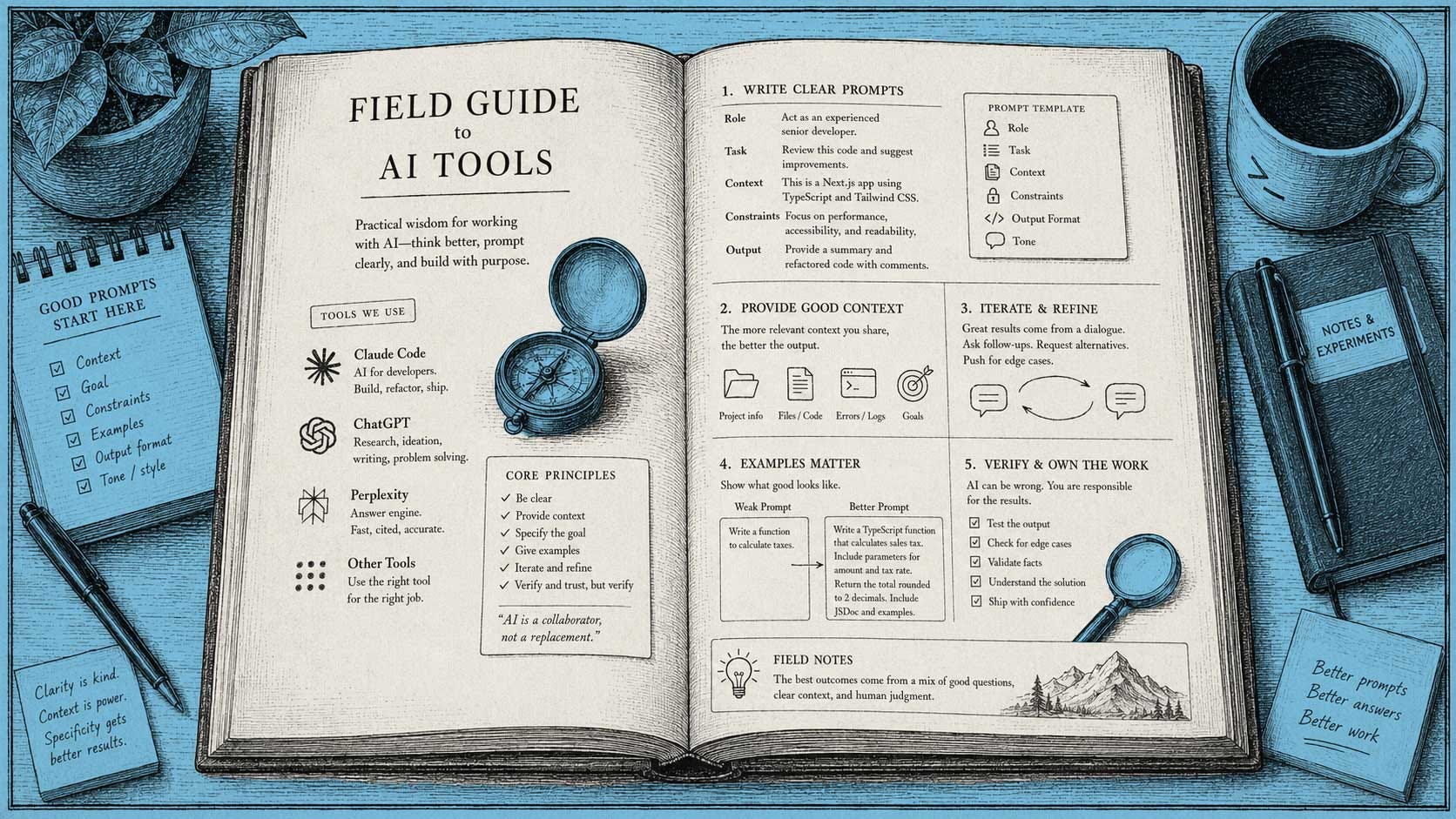
A field guide to AI prompting
This week, we’re sharing a chapter from Think. Prompt. Create, a book written by Joey Primiani’s, a member of the Design Better community.

Most of the anxiety we hear about AI isn’t really about AI. It’s about not knowing where to start. People tell us they’re worried about their jobs, but when we ask what they’ve actually tried, the answer is usually “not much yet.” The fastest way out of that spiral is the least comfortable one: open the tool and use it badly a few times until you get better at it.
Joey Primiani has put in thousands of hours doing exactly that. He’s a longtime Design Better subscriber, and he just published Think. Prompt. Create: A New Way to Build Software — a book about how to actually work with tools like Claude Code, not just poke at them. It’s a solid on-ramp if you’ve never touched one of these tools, and specific enough that people who already have will still walk away with something. We asked if we could run a chapter. He said yes.
What follows is Chapter 4, “The Art of the Prompt: Talking to Your AI Partner.” It offers a clear breakdown of why some prompts get you exactly what you wanted and others get you three hours of cleanup.
Get Think. Prompt. Create on Amazon →
Chapter 4: The Art of the Prompt, Talking to Your AI Partner
by Joey Primiani
Here is a secret that most Claude Code tutorials bury: the quality of your output is almost entirely determined by the quality of your input. Claude Code is extraordinary, but it is not psychic. It can only work with what you give it. Every frustrating session, every confusing output, every “why did it do that?” moment can almost always be traced back to an ambiguous or incomplete prompt.
The good news: prompt writing is a learnable skill, and the principles are simpler than you might think.
The Five Pillars of a Good Prompt
After thousands of hours working with Claude Code, I have distilled effective prompting into five principles. Master these and you will consistently get better output than most developers.
1. Be Specific About Outcomes, Not Steps
The single biggest beginner mistake is trying to be too prescriptive. People write prompts like:
“Create a function called getUserData, make it async, use the axios library to call https://api.example.com/users/{id}, and return the user object.”
When what they should write is:
“Add a function that fetches a user by ID from our API (https://api.example.com/users/{id}) and returns the user data. We’re already using axios elsewhere in the code.”
The first prompt is a recipe. The second is a goal. Claude Code is a senior developer, give it goals, not recipes. It will make better implementation decisions than you will if you try to micromanage every detail.
The exception: when you have specific, non-negotiable technical requirements, spell them out. “Use async/await rather than promises” or “the function must handle the case where the user doesn’t exist by returning null, not throwing” are legitimate constraints, not micromanagement.
2. Provide Context, Liberally
Claude Code knows your code only as well as it has read it. For a fresh session, that means Claude Code knows only what is in the files in your current directory. For a continuing session, it knows what it has read during the session.
When your request depends on something Claude Code may not have seen, tell it explicitly:
“In our app, authentication is handled by the AuthService class in src/services/auth.js. Given that setup, add an endpoint to /api/profile that returns the current user’s profile data, requiring authentication.”
You just told Claude Code: go read that file, understand how auth works, then implement the endpoint in a way that is consistent.
You can also directly ask Claude Code to read files before proceeding:
“Read src/database/schema.sql and src/models/user.js, then help me add a ‘last_login’ field to the users table.”
Claude Code will read both files and use them to inform its answer.
3. State Constraints Upfront
Every project has constraints, technology choices, coding conventions, performance requirements, compatibility needs. Front-load these in your prompt rather than waiting for Claude Code to make the wrong assumption:
“We’re using vanilla JavaScript with no frameworks. Our database is SQLite through the better-sqlite3 library (not async, it’s synchronous). Add a function to insert a new order.”
Without that context, Claude Code might produce async SQLite code, or use a different library, or assume you are in a React project. With it, you will get exactly what fits your stack.
This is also why the CLAUDE.md file is so valuable, it provides standing constraints for every session without you having to repeat them.
4. Use Examples When the Format Matters
If you have a specific output format in mind, a particular data structure, a specific visual style, a certain code pattern, provide an example:
“I want to add error handling to this function. We handle errors like this elsewhere in the codebase:
try { const result = await doSomething(); return { success: true, data: result }; } catch (error) { logger.error('doSomething failed', { error: error.message }); return { success: false, error: error.message }; }Please use the same pattern.”
Examples are unambiguous in a way that descriptions rarely are. Show, do not just tell.
5. Ask for Explanation When You Need to Understand
This is underused. Claude Code is not just a code generator, it is a teacher. If you want to understand what it is doing:
“Add the search functionality, and after you write the code, explain how it works in plain English, pretend I’m a beginner developer.”
Or at any point in a session:
“Before you write the code, explain your plan, what files you’ll touch, what the overall approach will be.”
This second one is especially useful for complex changes. If Claude Code’s plan sounds wrong to you, you can redirect before any code is written.
Prompt Patterns That Work
Here are specific prompt structures that consistently produce excellent results:
The “Context + Goal + Constraints” Pattern
[Context: describe the current state]
[Goal: describe the desired outcome]
[Constraints: technical or stylistic requirements]

Example:
"Our checkout form currently collects name, email, and address.
I want to add a phone number field that is optional.
The field should validate that the input is a valid phone number if provided, and we should use the same input component style as the existing fields."
The “Negative Space” Pattern
Tell Claude Code what to avoid:
“Add a caching layer for our API responses. Do NOT introduce any new dependencies, use only what’s already in our package.json.”
“Refactor this function to be more readable. Do NOT change its behavior or its interface, existing callers should not need to change.”
The “Scope” Pattern
When you want a focused change, explicitly bound it:
“Only look at the src/components/Header.jsx file. Don’t change anything else. Make the navigation links highlight when the current page matches.”
The “Thinking Out Loud” Pattern
For complex architectural decisions:
“I want to add real-time notifications to our app. Before writing any code, think through the options, we could use WebSockets, Server-Sent Events, or polling. Given that we’re on a serverless platform, explain which approach makes most sense and why.”
This produces a deliberate reasoning process rather than the first implementation that comes to mind.
Multi-Turn Conversations
Claude Code is not a single-shot tool. Some of the best work happens over multiple turns:
Turn 1: "I want to add user authentication to this app. What are the main
         things we need to implement?"

[Claude Code responds with a list: password hashing, session management,
login endpoint, registration endpoint, protected routes…]

Turn 2: "Let's start with user registration. Implement the registration
         endpoint and the password hashing."

[Claude Code implements…]

Turn 3: "Good. Now run our test file (! npm test) to make sure we haven't
         broken anything."

[Tests run, output shows…]

Turn 4: "The test for the user model is failing, the error is [paste error].
         Fix it."
This is how real development works. Not one big prompt, but an ongoing dialogue that iteratively builds toward the goal.
Prompts to Avoid
Just as valuable as knowing what works is knowing what does not:
Vague directives: “Make this better.” Better how? Faster? More readable? More secure? Be specific.
Too many things at once: “Add user authentication, redesign the homepage, fix the search bug, and add PDF export.” Pick one thing. Doing too many things in a single prompt produces muddled output and makes it hard to isolate problems.
Prompts without context in a fresh session: “Fix the bug in the user model.” What bug? Which file? Claude Code has not read your code yet.
Emotional framing: “This is terrible, please fix everything.” Claude Code does not have feelings (in any meaningful sense), but vague negative framing does not give it actionable direction. Say what you want, not how you feel about the current state.
The Feedback Loop
One of the most powerful things you can do is close the feedback loop by having Claude Code verify its own work:
“After you make the change, run
! npm testand show me the results.”“After building the form, open a quick server with
! npx serve .and tell me the URL so I can test it.”“Check if there are any obvious issues with the code you just wrote before I test it.”
That last one, asking Claude Code to review its own output, catches a surprising number of issues. It is not infallible, but it adds a quality gate with zero effort on your part.
Giving Good Feedback
When Claude Code produces something that needs adjustment, your feedback prompt is its own kind of craft:
Imprecise feedback: “This doesn’t look right.”
Better feedback: “The layout looks wrong, the button is appearing on its own line but it should be inline with the text input, side by side.”
Best feedback: “Here’s a screenshot of what I see [description or file], and here’s what I expected. The button should be to the right of the input on the same line, not below it. Can you fix the CSS?”
The more specific and visual your feedback, the more precisely Claude Code can target the fix.
The “Staff Engineer” Prompt
This is one I use regularly when I want the highest quality output:
“Approach this as a staff engineer who cares deeply about code quality, maintainability, and avoiding over-engineering. [Then your request.]”
Or even more specifically:
“Before writing code, think about whether there’s a simpler approach that achieves the same goal. I’d rather have 10 lines of boring code than 50 lines of clever code.”
The Claude model responds to framing. Invoking quality-conscious, experienced-developer framing tends to produce exactly that kind of output.
If this chapter was useful, the rest of the book goes deeper: how to structure CLAUDE.md files, when to trust Claude Code’s judgment versus your own, and how teams are changing their workflows around it entirely.
Get Think. Prompt. Create on Amazon →
Until next week, write your next prompt like you’re briefing a senior engineer, not filling out a form.
— Aarron & Eli